Understanding Variables and Data Types in JavaScript

Understanding Variables and Data Types in JavaScript
Who is this for? Complete beginners. No prior coding knowledge needed. If you've ever labeled a box before packing it, you already get the idea. 📦
📦 What is a Variable? (The Box Analogy)
Imagine you're packing boxes before moving to a new house.
You take a box, write "Books" on it, and put your books inside.
Later, when you need a book — you just look for the box labeled "Books".
A variable works exactly the same way in JavaScript.
The label on the box = the variable name
The stuff inside the box = the value
The act of packing = declaring the variable
let name = "Arjun";
//  ^^^^   ^^^^^^^
//  label  stuff inside the box
Why do we need variables? Because programs work with data — a user's name, their age, whether they're logged in or not. Variables let us store that data and use it later.
✍️ How to Declare Variables — var, let, and const
JavaScript gives you three ways to create a variable.
let — The most common one (use this by default)
let city = "Mumbai";
console.log(city); // Mumbai

city = "Delhi"; // ✅ You can change it
console.log(city); // Delhi
const — When the value should NEVER change
const country = "India";
console.log(country); // India

country = "Nepal"; // ❌ Error! You can't change a const
Think of const as a box that is welded shut after you pack it. Once it's sealed, nothing goes in or out.
var — The old way (avoid it in modern code)
var age = 25;
console.log(age); // 25
var was used before 2015. It still works, but it has some tricky behaviors that cause bugs. Stick with let and const for now.
📊 var vs let vs const — Quick Comparison
| Feature | var |
let |
const |
|---|---|---|---|
| Can be reassigned? | ✅ Yes | ✅ Yes | ❌ No |
| Block scoped? | ❌ No | ✅ Yes | ✅ Yes |
| Modern / recommended? | ❌ Old style | ✅ Yes | ✅ Yes |
| Use when... | Avoid it | Value will change | Value stays fixed |
💡 Simple rule: Use
constby default. Switch toletonly when you know the value will need to change.
🧱 Primitive Data Types
Data types tell JavaScript what kind of value is stored in a variable. Think of it like labeling your box more specifically — not just "stuff", but "fragile stuff" or "heavy stuff".
There are 5 primitive types you need to know right now.
1. 🔤 String — Text
Any text wrapped in quotes is a string.
let name = "Priya";
let greeting = 'Hello, world!';
let message = `My name is ${name}`; // template literal

console.log(name);     // Priya
console.log(message);  // My name is Priya
Real life: A person's name, an email address, a message — all strings.
2. 🔢 Number — Any numeric value
let age = 22;
let price = 99.99;
let temperature = -5;

console.log(age);         // 22
console.log(price);       // 99.99
console.log(temperature); // -5
Real life: Age, score, price, distance — all numbers.
3. ✅ Boolean — True or False only
A boolean has exactly two possible values: true or false. Nothing else.
let isLoggedIn = true;
let hasSubscription = false;

console.log(isLoggedIn);      // true
console.log(hasSubscription); // false
Real life: Is the light on? Is the user logged in? Did the payment succeed? — all yes/no questions = booleans.
4. 🚫 Null — Intentionally empty
null means "this variable exists, but it has no value on purpose."
let selectedCity = null;
// User hasn't selected a city yet
Think of it as an empty box that you deliberately left empty.
5. ❓ Undefined — Accidentally empty
undefined means a variable was declared but never given a value.
let score;
console.log(score); // undefined
The box exists and has a label — but nobody ever put anything inside it.
🗂️ Data Types at a Glance
| Type | Example | Real-life meaning |
|---|---|---|
| String | "Rahul" |
Any text |
| Number | 25 or 3.14 |
Any numeric value |
| Boolean | true / false |
Yes or No |
| Null | null |
Intentionally empty |
| Undefined | undefined |
Accidentally empty |
🏠 What is Scope? (Super Simple Explanation)
Scope means: "Where can this variable be accessed?"
Let's use a house analogy.
Imagine a house with rooms. Something kept in the living room can be seen by everyone in the house. But something kept inside a bedroom can only be used inside that bedroom.
let houseRule = "No shoes inside"; // 🏠 Available everywhere below

if (true) {
  let bedroomSecret = "My wifi password"; // 🚪 Only inside this block
  console.log(houseRule);      // ✅ Works fine
  console.log(bedroomSecret);  // ✅ Works fine
}

console.log(houseRule);      // ✅ Works fine
console.log(bedroomSecret);  // ❌ Error! Can't access bedroom from outside
letandconstrespect the room boundaries → block scopedvarignores room boundaries → it leaks out, which causes bugs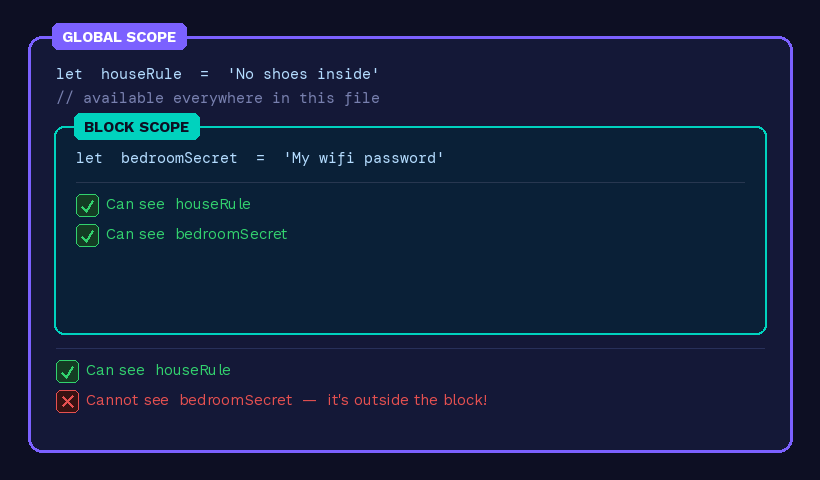
✍️ Practice Assignment
Try writing this code in your browser console (press F12 → Console tab) or on jsfiddle.net.
Task 1 — Declare and print variables
let myName = "Your Name Here";
let myAge = 20;
const isStudent = true;

console.log(myName);    // Your Name Here
console.log(myAge);     // 20
console.log(isStudent); // true
Task 2 — Try changing values
let score = 50;
score = 75; // ✅ Works! let can be changed
console.log(score); // 75

const country = "India";
country = "Nepal"; // ❌ What happens? Try it!
Task 3 — Explore data types
let fullName  = "Amit Sharma";   // String
let age       = 21;              // Number
let gpa       = 8.5;             // Number (decimal)
let passed    = true;            // Boolean
let hobby     = null;            // Null (not decided yet)
let nickname;                    // Undefined (no value given)

console.log(typeof fullName); // "string"
console.log(typeof age);      // "number"
console.log(typeof passed);   // "boolean"
console.log(typeof hobby);    // "object" ← JavaScript quirk!
console.log(typeof nickname); // "undefined"
💡 Bonus: Notice how
typeof nullgives"object"instead of"null"— that's a famous JavaScript bug from 1995 that was never fixed to avoid breaking old websites!
🎯 Quick Recap
A variable is a named box that stores a value
Use
constwhen the value won't change,letwhen it willAvoid
var— it's old and causes scoping issuesStrings = text, Numbers = numeric, Boolean = true/false
Null = empty on purpose, Undefined = empty by accident
Scope = where a variable can be seen and used